Excellent
A confident, well-rounded pick.
At a glance
Kama is a well-rounded choice for publishers and businesses building content-driven Drupal 10/11 sites who want a head start with multiple layouts and a drag-and-drop builder. Its one-time $48 price is strong value for the feature set, and Gavias's update cadence signals a reliable long-term investment. It is best suited to teams with at least basic Drupal familiarity; pure beginners to the platform should factor in a steeper CMS learning curve alongside the theme itself.
Best for
The review
4 min readWhat Is Kama and Who Is It For?
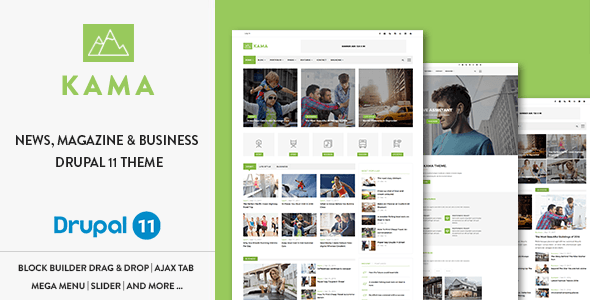
Kama is a premium Drupal theme developed by Gavias, a studio with a long track record in the Drupal marketplace. Positioned squarely in the Blog & Magazine category, it targets editors, publishers, and small-to-medium businesses that need a content-heavy site without commissioning a custom build. Whether you're launching a thematic news portal, a corporate blog, or a general-interest online magazine, Kama's feature set is designed to cover those scenarios without requiring a different theme for each.
It is also a credible option for business and corporate landing pages. The listed use cases — news, landing page, video, gallery, portfolio — signal a genuinely multipurpose scope, so teams running a hybrid site (say, a company that also publishes editorial content) will find the layout variety useful.
Standout Capabilities
Gavias Block Builder
The headline feature is the proprietary Gavias Block Builder, a drag-and-drop tool for assembling page blocks without writing PHP or custom templates. For Drupal — a platform that has historically demanded more developer involvement than WordPress — this is a meaningful convenience. It lowers the barrier for site owners who are comfortable in a CMS admin panel but not in a code editor. A video guide is included, which shortens the learning ramp.
Six Homepage Demos and Content Variety
Six distinct homepage layouts ship with the theme, covering different editorial styles from dense news grids to cleaner magazine spreads. Coupled with support for multiple custom content types — Article, Course, Lesson, Team, Portfolio, Video, and Gallery — Kama gives content teams genuine structural flexibility. Ajax-powered tabs and an Ajax load gallery add interactivity without requiring separate modules for basic functionality.
Drupal 10 and 11 Compatibility
The metadata confirms compatibility with Drupal 9.x and 10.x, and the theme name explicitly references Drupal 11, with the author last updating it in April 2025. Keeping pace with Drupal's release cycle is a real commitment — many themes stall on older core versions — and Gavias appears to be honoring it here. Buyers investing in a long-running publication can have reasonable confidence the theme won't become an upgrade blocker in the near term.
Bootstrap Foundation and Broad Browser Support
The responsive layout is built on Bootstrap, which means predictable grid behavior and a wide pool of front-end developers familiar with the codebase if you ever need customization. Browser support spans Chrome, Firefox, Safari, Opera, Edge, and even IE11 — relevant for organizations whose audiences still include legacy enterprise desktop users.
Pricing and Value Assessment
At $48 one-time, Kama sits in the affordable tier for premium Drupal themes. There is no recurring subscription for the license itself. That said, buyers should factor in that marketplace licenses typically cover six months of author support; extended support is available at an additional cost. For a publication or business that will rely on this theme for years, budgeting for a support renewal is sensible rather than optional.
The feature density — block builder, multiple demos, several custom content types, Ajax interactions — compares favorably to what $48 buys on other platforms. Drupal themes at this price point rarely bundle this breadth of layout tooling.
Reading the Ratings and Sales History
Kama holds a 5.00/5 buyer rating across 13 reviews and has recorded 217 total sales. The perfect score is encouraging, but 13 reviews is a modest sample — it reflects a niche, specialist audience rather than the thousands of reviews attached to blockbuster WordPress themes. Our editorial team reads this as a sign of a satisfied but relatively small user base, not a red flag. The sales figure of 217 is consistent with the Drupal premium-theme market, which is naturally smaller than WordPress. It also suggests the theme hasn't been abandoned; active sales typically correlate with continued author maintenance.
Who Should Look Elsewhere
Kama is a multipurpose theme, and that breadth comes with trade-offs. If your site is highly specialized — a pure e-commerce store, a membership community, or a heavily custom web application — a more focused Drupal solution will likely serve you better than adapting a magazine theme. Similarly, teams with no Drupal experience should weigh the platform learning curve independently of the theme; Kama's block builder eases layout work, but Drupal's taxonomy, content type, and permissions model still requires familiarity.
Buyers who want a page builder experience comparable to Elementor or Divi on WordPress should also calibrate expectations: Gavias Block Builder is a capable tool, but it operates within Drupal's architecture, which is inherently more structured. Finally, if cutting-edge front-end performance benchmarks are a hard requirement, Bootstrap 3 (referenced in the author description) is an older framework generation, and the asset weight of a feature-rich theme deserves scrutiny before go-live.
Our Bottom Line
For the right buyer, Kama offers a lot of ground covered at a competitive one-time price. The active maintenance record, multiple demo layouts, and proprietary block builder make it one of the more complete options in the Drupal magazine-theme category. Approach it as a solid starting point that will still require Drupal-side configuration work, and you'll get genuine value from the $48 investment.
The trade-offs
What works, what to weigh
What works
- Actively maintained through Drupal 10/11 compatibility as of April 2025, reducing upgrade risk
- Proprietary drag-and-drop Block Builder lowers layout customization barrier for non-developers
- Six homepage demos plus multiple custom content types (Video, Portfolio, Gallery, Team, etc.) support varied site structures
- One-time $48 license is competitively priced for the feature breadth in the Drupal marketplace
- Bootstrap-based responsive grid with wide browser support including IE11 for legacy audiences
- Well-documented with video guides, shortening onboarding time for new site owners
What to weigh
- Modest buyer review count (13 reviews) makes the perfect 5-star rating statistically thin
- Multipurpose scope adds template and asset weight that may require optimization for performance-sensitive deployments
- Bootstrap 3 foundation is an older framework generation; front-end developers may need to account for its limitations
- Drupal's inherent configuration complexity (content types, taxonomy, permissions) remains regardless of the theme's ease-of-use tools
- Extended author support beyond the initial license period carries an additional cost
Under the hood
Specs & compatibility
- On the market
- 9 years ago
- Columns
- 4+
- Documentation
- Well Documented
- Files included
- PHP Files, CSS Files, JS Files
Marketplace-listed browser compatibility: IE11, Firefox, Safari, Opera, Chrome, Edge.
Editorial scores are judgements about documented features and marketplace signals, not measured speed or support benchmarks. Marketplace data last checked: 2026-07-08. Read our assessment method.
Questions, answered
Frequently asked
Is Kama compatible with Drupal 11, or is it limited to older versions?
The theme is marketed as a Drupal 11 theme, and the author updated it as recently as April 2025, signaling active maintenance. The documented software compatibility lists Drupal 9.0.x through 10.x, so buyers targeting Drupal 11 specifically should confirm the current compatibility status directly with Gavias before purchasing.
Is Kama beginner-friendly for someone new to Drupal?
Kama includes a drag-and-drop block builder, well-documented setup guides, and two installation paths (fresh or existing site), which lower the setup barrier. That said, Drupal itself has a steeper learning curve than platforms like WordPress, so first-time Drupal users should budget extra time to get comfortable with the CMS fundamentals alongside the theme.
What do you get for the $48 one-time price — are updates and support included?
The $48 license is a one-time purchase that includes the theme files, documentation, and future updates from Gavias. The April 2025 update date suggests the author is actively maintaining the product. Standard Envato-style marketplaces typically bundle a limited support period with purchase; buyers should check the listing for the exact support term before checkout.
Can Kama handle both a news magazine and a business/corporate site?
Yes — the theme ships with six homepage demos and supports custom content types including Article, Portfolio, Video, Gallery, Team, and more, making it adaptable to both editorial and corporate use cases. The Bootstrap-based responsive layout and landing page demos add further flexibility for business-focused builds.
How trustworthy is this theme given it has only 13 ratings?
Kama holds a perfect 5.00/5 rating across all 13 reviews and has recorded 217 total sales, which points to a consistently positive buyer experience for a mid-volume product. The combination of an active update history and an established author studio (Gavias) further supports its reliability, though the relatively modest review count is worth noting compared to blockbuster themes.
Does Kama work in all major browsers, including modern Edge and older IE11?
The theme's compatibility list covers Chrome, Firefox, Safari, Opera, Edge, and IE11, so it addresses the vast majority of desktop browsers your readers are likely to use. Keep in mind that IE11 reached end-of-life in 2022 and has a negligible global market share today, so IE11 support is a minor bonus rather than a key purchasing factor for most sites.
Our verdict
Kama is a well-rounded choice for publishers and businesses building content-driven Drupal 10/11 sites who want a head start with multiple layouts and a drag-and-drop builder. Its one-time $48 price is strong value for the feature set, and Gavias's update cadence signals a reliable long-term investment. It is best suited to teams with at least basic Drupal familiarity; pure beginners to the platform should factor in a steeper CMS learning curve alongside the theme itself.
Topics & features
Keep exploring
About the author
Gavias has been selling on Envato since August 2014 and has accumulated nearly 25,000 total marketplace sales — a strong track record for a specialist Drupal studio. Our editorial team has reviewed 25 of their themes, covering business, education, directory, magazine, and niche industry categories.
- Reviewed by us
- 30 themes
- Avg editorial score
- 8.2/10
- Marketplace sales
- 25K
- Selling since
- 2014
This page contains affiliate links — we may earn a commission if you purchase through them, at no extra cost to you.