TThemeForgeTheme Reviews

Curated shortlist

BestWordPressMembershipPlugins

Finding the best WordPress membership plugin means balancing features, reliability, and long-term support — and the options vary widely. Our editorial team assessed six leading plugins using marketplace sales volume, verified buyer ratings, review depth, and category fit to build this 2026 shortlist. Whether you're gating content, selling subscriptions, or building a full community, there's a clear fit here for each use case.

6
Ranked picks
8.4
Avg editorial score
$39–$149
Price range
105K
Combined sales

Ranked by our editorial rubric · updated

Pick 01Top pickBest rated

Youzify - BuddyPress Community & WordPress User Profile Plugin
4.9810K sales$49
9.2
Youzify - BuddyPress Community & WordPress User Profile Plugin screenshot

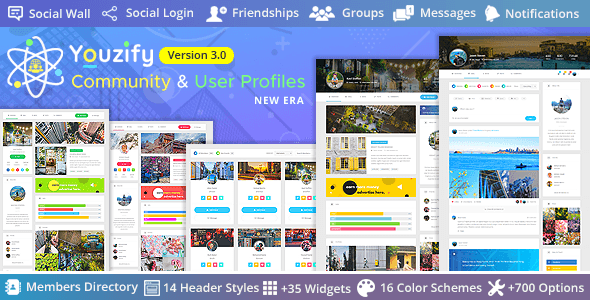
Youzify is the strongest choice when community is the product. Built on BuddyPress, it delivers polished user profiles, activity feeds, social groups, and gamification features that generic membership plugins can't match. With a near-perfect 4.98-star rating across 832 reviews and 10,000 sales, buyer satisfaction is unusually consistent.

Best forsites where member interaction and social engagement are central, not just content access control.

Read our review

Pick 02

ARMember - WordPress Membership Plugin
4.7113K sales$149
8.7
ARMember - WordPress Membership Plugin screenshot

ARMember is a full-featured membership system with strong content restriction, recurring billing, and a form builder built in — all at a premium price point of $149. Its 4.71 rating across 418 reviews and 12,700 sales reflects a solid, broad-purpose tool. The higher cost is a consideration for early-stage projects.

Best forestablished sites that need a comprehensive, all-in-one membership solution and want to minimize third-party add-ons.

Read our review
WordPress Membership Plugin – UltimateMembershipPro - Restrict Content & Recurring Subscriptions screenshot

UltimateMembershipPro is the category's most commercially proven option — 41,100 sales is a significant lead over competitors. It covers content restriction, recurring subscriptions, and multiple membership levels at a mid-range $69 price. The 4.55 rating across nearly 1,000 reviews suggests reliable quality with occasional rough edges.

Best forsite owners who want a well-tested, widely deployed plugin with a broad feature set and strong community resources.

Read our review
Ultimate Affiliate - WordPress Affiliate Plugin & Affiliate Program for WooCommerce with MLM screenshot

Ultimate Affiliate is purpose-built for referral and multi-level affiliate programs, with WooCommerce integration at its core. At $89 and 4.58 stars from 367 reviews, it occupies a niche that pure membership plugins don't serve well. It's not the right pick for content gating, but it's a strong standalone choice for monetizing your audience through affiliate structures.

Best forWooCommerce store owners launching a formal affiliate or MLM-style referral program.

Read our review

Pick 05Best value

UserPro - Community and User Profile WordPress Plugin
4.3321K sales$39
8.1
UserPro - Community and User Profile WordPress Plugin screenshot

UserPro is the most affordable option here at $39, with 20,900 sales demonstrating sustained demand. Its 4.33 rating across 1,700 reviews — the largest review pool in this list — points to a capable but occasionally inconsistent experience. Community profiles and social login are highlights; advanced access restriction is less robust.

Best forbudget-conscious projects that prioritize user profile customization and social features over complex membership rules.

Read our review

Pick 06

Ultimate Learning Pro WordPress Plugin
4.133K sales$59
7.8
Ultimate Learning Pro WordPress Plugin screenshot

Ultimate Learning Pro extends membership concepts specifically into online course delivery — think content dripping, lesson locking, and student progress tracking. With 2,500 sales and a 4.13 rating from 71 reviews, it's newer to the market and carries more uncertainty than the others.

Best foreducators or course creators who need a lightweight LMS with built-in membership controls and don't want the overhead of a full-scale LMS platform.

Read our review

How to choose

How to Choose a WordPress Membership Plugin

Membership plugins touch almost every part of your site — payments, user roles, content access, emails, and sometimes your entire community experience. Getting this decision wrong is costly to reverse, so it's worth thinking carefully before you commit.

Define your core use case first

There's a meaningful difference between a plugin built primarily for content restriction and recurring billing, one designed for community and user profiles, and one that layers in affiliate or referral programs. Many plugins try to do all three, but most do one thing exceptionally well. Be honest about what your site actually needs on day one versus what you might want in year two — bloated feature sets add complexity and slow down your site.

Check payment gateway and WooCommerce compatibility

Recurring subscriptions live or die by payment reliability. Before purchasing, verify that your preferred gateway (Stripe, PayPal, Authorize.net, etc.) is supported natively — not just via a third-party workaround. If you're already running WooCommerce for physical or digital products, look for a plugin with a first-class WooCommerce integration rather than a parallel checkout flow that confuses buyers.

Content restriction granularity matters

Some plugins restrict at the page or post level only. Others let you drip content on a schedule, lock individual blocks or sections within a post, or hide pricing tables from logged-in members. Think through your content model before you test — a plugin that looks fully featured in the demo may not support the access rules your course or publication actually requires.

Ratings and sales volume tell part of the story

A plugin with 40,000+ sales and a 4.5-star rating has been stress-tested by a large, diverse user base. That breadth often means more edge cases have been caught and fixed. Conversely, a newer plugin with fewer reviews but a near-perfect score may reflect a smaller, highly engaged audience — not necessarily a better product at scale. We weigh both signals together, not in isolation.

Common mistakes to avoid

  • Skipping the documentation review. Thin or outdated docs are a reliable signal that support will be slow when something breaks.
  • Overlapping plugins. Running two membership or community plugins side by side creates role conflicts and bloat. Pick one and extend it.
  • Ignoring update cadence. A plugin that hasn't been updated in 12+ months is a security and compatibility risk, especially as WordPress core evolves.
  • Assuming migration is easy. Moving members, subscriptions, and access rules from one plugin to another is painful. Choose carefully the first time.

Budget realistically

Marketplace license prices are one-time fees for use on a set number of sites, but they typically include only 6 or 12 months of support. Factor in renewal costs if you want continued updates and support — for a business-critical plugin, that ongoing investment is almost always worth it.